RpgTools
RpgTools is a set of tools which allow to you create a 2D RPG or supports your existing game by providing tools you can use on top of it.
RpgTools.exe is the executable which contains all tools to create your content.
Game.exe is the executable you can use to test your game, this will also be used for the exported game(The game that will be deployed)
For discussions/questions about it the best way is to do that via Discord Channel
You can always download the latest version of the tools here
If you want to support the development of my tools you can do that via Patreon
You can find a list of highlevel features here
FAQ
Are there any tutorials ?
I frequently post updates in my Youtube channel which also contains a video tutorial playlist which you can find here
Besides that you can find more information in this guide.
Where can I get help
The best place is my Discord channel
Where can I download old versions ?
If you use the itch.io launcher you can install old versions via Settings->Manager->Switch versions
Recommended directory setup
Since PVGames assets use a deep directory structure it can easily happen that paths are bigger than 256 characters which can cause issues on older windows version.
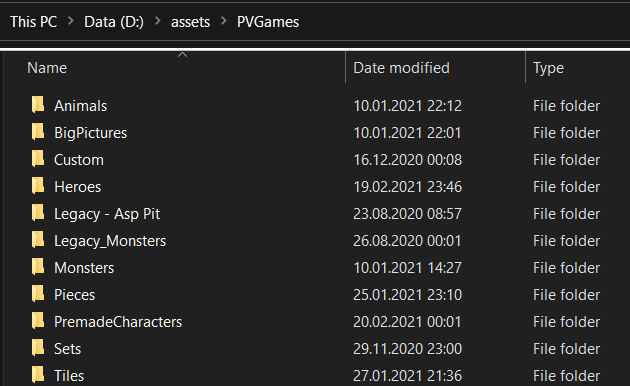
As a workaround I would suggest to put them in a directory close to the root directory, e.g. C:\assets\PVGames
Inside of that you can group them as you like but for PvGames assets it is important to keep the Character folders as they are(But you can move the whole folder to sub directories)
This is an example folder setup:
- Avoid manual modifications of filenames from PVGames assets : The tool searches files using the PVGames naming conventions. If you rename files / add files to character directories it might confuse the alorithm which analyzes everything.
Tools
There are several tools inside the RpgTools executable. The two main tools (Character Creator and Level Editor) can be used with any engine you want, the other tools are mostly meant to be used if you want to use this engine to create your game.
Character Creator
This is the tutorial for the Character Editor
Level Editor
This is the tutorial for the Level Editor
Scripting
This is the tutorial for the Scripting Language
Custom animations
This is the tutorial for custom animations
Game animations
This is the tutorial for game animations
Custom models
This is the tutorial for custom models
Game Localization
This is the tutorial for the Game Localization
Tool Localization
This is the tutorial for Tool Localization
Video Playback
This is the tutorial for Video Playback
Libraries used
https://github.com/SFML/SFML
https://github.com/ocornut/imgui
https://github.com/texus/TGUI
https://github.com/eliasdaler/imgui-sfml
https://github.com/ThePhD/sol2
https://github.com/nlohmann/json
https://github.com/erincatto/box2d